🏞️ Build Your Profile
Your ProAngler profile is your home base - where fans, sponsors, and fellow anglers can learn about you and your story. This page describes the important elements of your profile. View guides for detailed editing instructions.
Main Header
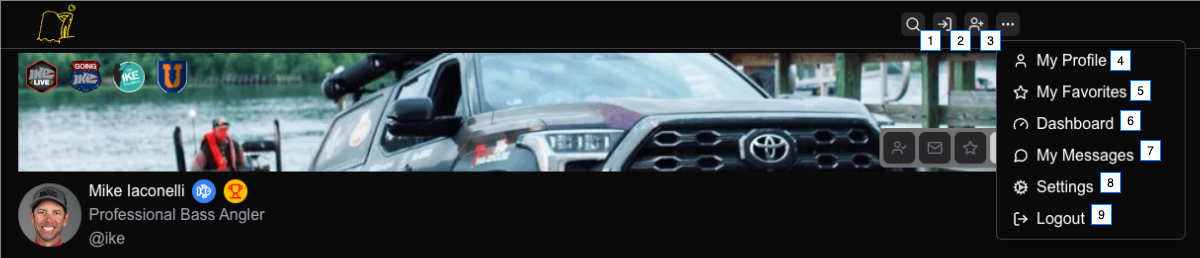
- Search
- Log In
- Sign Up
- Go to your profile (must be logged in)
- Show your favorite profiles (must be logged in)
- Go to your dashboard (must be logged in)
- Go to the messaging app (must be logged in)
- Go to your settings (must be logged in)
- Log out
Profile Header
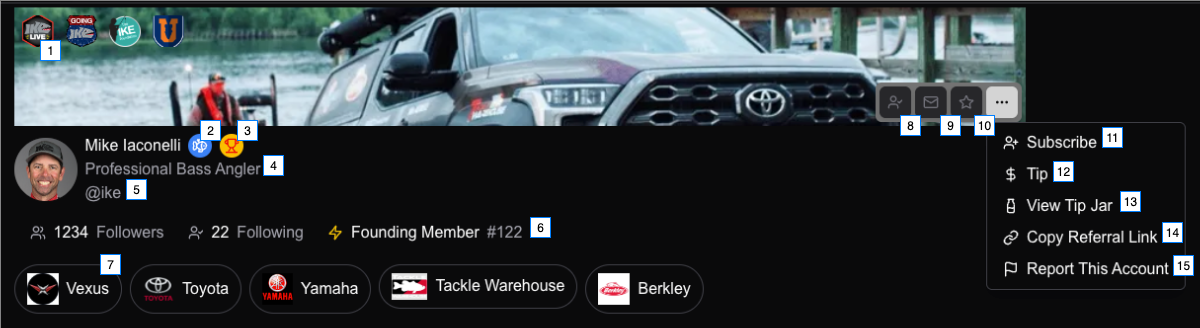
- Sponsor or Interest Logos. Max 4. Link internally for angler points or externally with referral link.
- "Verified Pro" Badge. Automatic with a pro account.
- "Verified Bassmaster Pro" Badge. Species specific when you compete in a "major".
- ProAngler title - set in settings (must be logged in)
- ProAngler handle (unique) - set in settings (must be logged in)
- Founding Member: First 5000 "Pro" accounts - qualify for special rewards not generally available.
- Sponsor Logos. Max 5. Link internally for angler points or externally with referral link.
- Follow this Angler (must be logged in)
- Message this Angler (must be logged in and must have a pro account)
- Add Angler to your favorites (must be logged in)
- Subscribe to this Angler (COMING SOON)
- Tip this Angler (COMING SOON)
- Angler Tip Jar (COMING SOON)
- Copy Angler's referral link. Earn angler points when used in your profile.
- Report an account that is violating our TOS or reserved a handle that is your Copyright or Trademark.
Creating Your Profile
- Sign up at proangler.com/auth/signup
- Choose your unique handle (e.g.,
@yourname) - Complete your profile information
Profile Sections
Basic Information
- Display Name - Your full name or brand name
- Handle - Your unique @username
- Title - A short tagline (e.g., "Pro Bass Angler")
- Bio - Tell your story in a few sentences
Profile Images
- Avatar - Your profile picture (recommended: 400x400px)
- Banner - Header image for your profile (recommended: 1200x400px)
Customizing with Plugins
Your profile can display various content types through plugins:
- Featured videos
- Product recommendations
- Upcoming events
- Sponsor logos
- Social media feeds
Privacy Settings
Control who can see your content and how they can interact with you in your dashboard settings.